

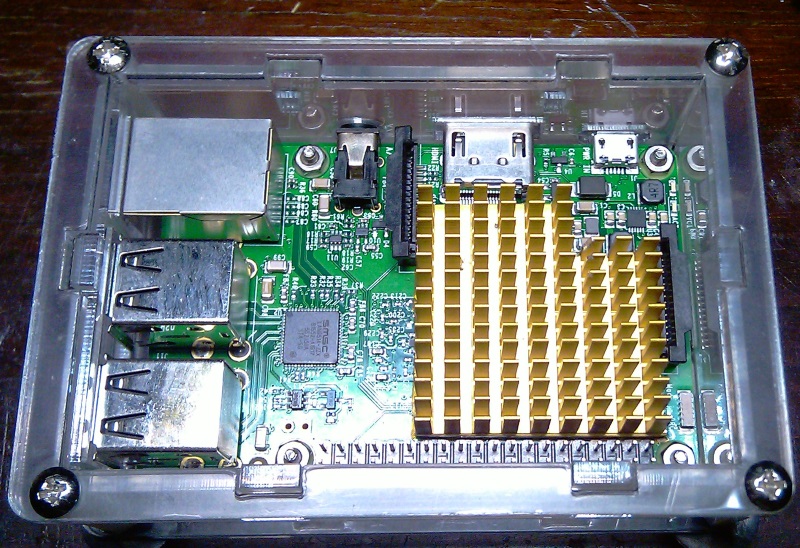
To extend the operational lifespan of a Raspberry Pi single-board computer (SBC) acting as a server, a custom cooling system upgrade was performed. The modification involved repurposing a large passive heatsink salvaged from a PC motherboard chipset (bridge). This article compares the thermal performance of the stock cooling system against the upgraded custom solution.
CPU temperature results for the Raspberry Pi 3 Model B were evaluated under the following conditions:
- Using the stock cooling system (based on approximate data gathered during early usage);
- Without any heatsink at all (referencing the article “Thermal imaging of Raspberry Pi 3…“, where temperatures reached an alarming 101°C);
- Using the upgraded custom cooling system, tracking the temperature over time. The implementation of this upgraded system took place in two distinct phases.
Temperature measurements were consistently conducted at an ambient room temperature of 22°C. CPU temperature and utilization were tracked using the built-in CPU and temperature monitor in the Raspbian OS.

Raspberry Pi 3 Model B with Stock Cooling System
The Stock Heatsink
The “stock” cooling system refers to the standard, small aluminum heatsink that was included in the kit with the computer.

CPU Temperature with Stock Cooling
When using the stock heatsink, the CPU temperature fluctuates across a wide range of 45 ÷ 88 °C depending on the load. In an idle state, CPU utilization is mostly at 0%, with rare and brief spikes up to a few percent. A heavy load state was achieved by launching Eclipse and compiling a Java application. Under this load, CPU utilization spiked to around 95% for short durations.
High CPU temperatures lead to thermal throttling and significantly reduced performance. Furthermore, such wide and frequent temperature fluctuations inevitably reduce the physical lifespan of the computer.
Upgraded Cooling System for Raspberry Pi 3 Model B
The upgraded cooling system utilizes a much larger heatsink mounted directly to the CPU of the single-board computer. A larger heatsink has a higher thermal capacity, which on one hand adds thermal inertia to the system (it takes longer to heat up), and on the other hand, it dissipates heat much more effectively due to its significantly larger surface area.
Mounting the Heatsink
A heatsink salvaged from a PC motherboard chipset bridge was modified—excess material was trimmed off to allow it to fit onto the Raspberry Pi PCB without hitting adjacent components. To prevent short circuits, a custom-cut gasket made of heat-resistant insulating film was placed between the computer board and the heatsink. The film was cut to match the heatsink’s footprint with a slight margin, leaving a window exclusively for the CPU die. The heatsink was then permanently mounted to the CPU using thermally conductive adhesive.

Results Obtained:
The custom heatsink was actually installed twice. The first installation occurred after a few weeks of using the stock heatsink, aiming to resolve thermal issues. Coincidentally, the SD memory card was replaced during this exact same period. As a result, the computer began experiencing frequent crashes, up to total OS failure. Suspecting the heavy heatsink might have damaged the board or caused a short, the cooling system was reverted to the stock heatsink, and the memory card was replaced again. After a long period of successful, stable operation, the large heatsink was reinstalled in early November 2019. Since then, the computer has operated with the exact same rock-solid stability as with the stock cooling. Because human error cannot be 100% ruled out, I am leaving the initial “negative” results below, although their relevance is highly questionable.
Negative Results
After a week of operation, the failure rate increased, manifesting as random Raspberry Pi system freezes. The exact cause could not be definitively established because:
These were my very first attempts at installing an OS on a Raspberry Pi, so configuration errors could not be ruled out;The cooling system was later reverted to stock, and simultaneously, the SD memory card was upgraded to a larger capacity. It was subsequently discovered that the initial memory card was of poor quality, though the exact moment it began failing is unknown.
Ultimately, the root problem was indeed the faulty memory card, not the heatsink.
Positive Results
Both the temperature fluctuation range and the average CPU temperature dropped significantly in both idle and under load. In an idle state at an ambient 22°C (0% CPU load with rare spikes up to 5%), the temperature steadily hovered in the 39 ÷ 42°C range, most often sitting exactly at 41°C.
The computer was artificially stress-tested at 100% CPU load, with only rare dips within a 5% margin.

At the 24-minute mark of the stress test, the PC froze (likely due to the extreme synthetic load). However, extrapolating from the recorded thermal curve, it is highly unlikely the temperature would have exceeded 75°C.

Under normal operating conditions as a server, the CPU temperature now rarely reaches 55°C. For a Raspberry Pi operating at standard room temperatures, installing a passive heatsink of this size appears to be the optimal balance—vastly superior to the tiny stock heatsinks, yet avoiding the noise and complexity of large active cooling (fan) solutions.